Google Ads for Contractors: A Small Plumbing Budget Guide
If you run a small plumbing company and you have tried to figure out Google Ads, you have probably seen the same advice: hire an agency, spend $5,000 a month, and wait six months. This guide is for the one- or two-truck plumber who wants to run profitable campaigns on a real budget.
If you run a small plumbing company and you have tried to figure out Google Ads for contractors, you have probably seen the same advice over and over: hire an agency, spend $5,000 a month, and wait six months for results. That advice ignores the reality of running a one-truck or two-truck plumbing shop where every dollar counts and you need jobs this week, not next quarter. This guide is different. It is written for plumbing contractors who want to run their own Google Ads on a budget between $500 and $2,500 a month and actually see qualified leads turn into booked work. By the time you finish reading, you will know exactly how to structure a campaign, pick keywords that convert, build landing pages that get calls, and track every dollar so you know what is working and what is wasting money.
Why Google Ads Is the Smartest Marketing Bet for Plumbing Contractors in 2026
When a homeowner wakes up to a flooded basement or a water heater that quit in the middle of a shower, they do not open Instagram. They do not scroll through Facebook. They grab their phone and type "emergency plumber near me" into Google, and Fannit's plumbing marketing program is built to put your business in front of them at that exact moment. That search is the most valuable moment in plumbing marketing because the person searching has an immediate, painful problem and they need a solution right now. Google reports that 59% of consumers use search engines to research a purchase before committing, and for emergency home services, that number is almost certainly higher.
This is what makes Google Ads for home service businesses fundamentally different from other advertising channels. You are not interrupting someone who might someday need a plumber. You are showing up exactly when they are actively looking for one. That intent is what drives the economics of contractor PPC. The average cost per lead for construction and general contracting on Google Ads sits around $165.67, but plumbing often performs better because emergency and urgent service calls convert at higher rates. When someone's basement is flooding, they are not comparison shopping six different plumbers and reading reviews for an hour. They are calling the first credible option they see.
Compare that lead cost to the lifetime value of a plumbing customer. A single emergency call might turn into a water heater replacement, a bathroom remodel, and five years of maintenance calls. That one lead could be worth thousands of dollars over time, which makes a $50 or $100 cost per lead look like a bargain.
Speed is the other reason Google Ads wins for small plumbing companies. Paid ads can produce qualified leads within two to four weeks. Organic SEO, while essential for long-term growth, typically takes four to six months to compound and deliver consistent results. If you need jobs this month to cover payroll or keep your trucks moving, Google Ads is the only digital channel that delivers on that timeline. SEO remains the long game you should be playing, but Google Ads is the bridge that keeps revenue flowing while your organic rankings build.
The competitive landscape makes this even more important. Large plumbing franchises and national brands dominate the organic search results with years of content, backlinks, and domain authority. A small local shop cannot outrank them overnight, but Google Ads levels the field. A well-optimized ad with a strong offer and a solid landing page can appear above those organic results regardless of how long your website has existed or how many backlinks you have. That is a rare advantage in an industry where scale usually wins.
Setting a Realistic Google Ads Budget for a Small Plumbing Company
What $500 to $2,500 Per Month Actually Buys You
The budget question is where most plumbing contractors get stuck, and it is easy to understand why. If you are evaluating whether to hire an agency to manage that budget, the best plumbing marketing agencies guide covers what to look for. You see numbers thrown around like $2,500 a month as a "typical" contractor Google Ads budget, and you wonder if you can even afford to play the game. The answer is yes, but what you get varies dramatically based on how much you spend and how tightly you manage the campaigns.
At the $500 per month floor, you are operating with extreme discipline. This budget limits you to one or two high-intent keywords in a tight geographic radius, probably a 10 to 15 mile circle around your shop. You can expect roughly 15 to 30 clicks and somewhere between 3 and 8 leads per month, depending on your local cost per click. This works best when you focus exclusively on emergency plumbing services where conversion rates are highest. A homeowner with a burst pipe at midnight is far more likely to call the first number they see than someone casually researching bathroom remodel ideas on a Sunday afternoon.
The $1,500 to $2,500 sweet spot is where most small plumbing companies should aim. At this level, you can run separate campaigns for emergency services, standard service calls like drain cleaning and leak detection, and higher-ticket replacement work like water heaters. You can also maintain a presence on Google Local Services Ads alongside your traditional search campaigns. This budget range gives you enough data to make real optimization decisions instead of guessing based on a handful of clicks.
Daily budget math helps put this in perspective. A $20 per day budget works out to about $600 a month, which is workable for plumbing if you use precise location targeting and aggressive negative keyword lists. A $10 per day budget, or $300 a month, is possible but requires weekly pausing of underperforming keywords and a heavy reliance on call-only ads that skip the landing page entirely. At that level, there is zero room for waste.
The cost per click reality varies by market, but plumbing keywords in competitive metropolitan areas can range from $15 to over $60 per click. In Austin, Texas, for example, a top-of-page bid for "bathroom remodeling" runs around $59.59 per click. Service-focused keywords like "plumber near me" or "drain cleaning" are often somewhat cheaper but still significant. Before you commit to any budget, use Google's Keyword Planner to check actual bid ranges and search volumes for your specific service area. Guessing at this number is the fastest way to burn through a small budget with nothing to show for it.
How to Estimate Your Break-Even Cost Per Lead
Knowing your numbers is not optional if you want to run profitable Google Ads. Start by calculating your average job profit. If a typical service call generates $500 in profit after labor, materials, and overhead, and you know from experience that roughly one in three leads converts to a booked job, then each lead is worth about $167 in expected value. Your target cost per lead needs to come in below that number for the math to work.
A healthy Google Ads program for contractors generates at least a 3x return on ad spend. If you are spending $1,500 a month, you should be generating at least $4,500 in profit from those leads. Notice that is profit, not revenue. Revenue numbers look bigger and feel better, but they do not pay your mortgage. Track profit per job and use that as your north star.
The most important budget discipline for small contractors is starting conservative and scaling only what works. Begin with your highest-intent keywords only. Run them for two to three weeks to accumulate conversion data. Then double down on the keywords, ads, and landing pages that are producing calls and booked jobs, and pause everything else. Most small plumbing companies waste money by spreading their budget too thin across too many keywords and campaigns before they know what actually converts.
Keyword Strategy: Targeting High-Intent Searches Without Wasting a Dollar
The Core Keyword Tiers for Plumbing Contractors
Not all plumbing keywords are created equal, and treating them as interchangeable is a fast way to waste your budget. The Google Ads setup guide for contractors walks through the full campaign structure step by step. Think of your keywords in three tiers based on the searcher's intent.
Tier one covers emergency and urgent intent. These are searches like "emergency plumber," "24 hour plumber," "water heater repair," and "burst pipe repair." These keywords have the highest conversion rates in all of home service advertising because the need is immediate and the searcher is not browsing. They are also the most competitive and expensive, so bid accordingly and make sure your landing page and phone response time match the urgency of the search.
Tier two covers service-specific intent. These are quote-stage searches like "drain cleaning," "leak detection," "pipe repair," "sewer line replacement," and "bathroom remodeling." The searcher has a specific problem and is looking for a solution, often comparing options and pricing. Use phrase match and exact match to control spend on these terms, and make sure your ad copy and landing page speak directly to the specific service.
Tier three covers branded and geo-modified searches. These include "plumber [city name]," "best plumber near me," and "[your company name] plumbing." These often have lower cost per click and higher conversion rates because the searcher is actively comparing local options or already knows your brand. Combine these with tight location targeting for maximum efficiency.
Building Your Negative Keyword List: The Budget Saver
Negative keywords are the single most underrated tool in contractor Google Ads management, and for small budgets, they are the difference between profitability and a wasted ad spend. A negative keyword tells Google not to show your ad when someone's search includes that term. Without a strong negative keyword list, you will pay for clicks from people who have no intention of hiring a plumber.
The first category to block is DIY intent. Add "how to fix," "DIY," "repair guide," "YouTube," "home depot rental," and similar terms as negatives immediately. Someone searching "how to fix a leaky faucet YouTube" is not going to call you, but Google might show your ad anyway if you are not careful.
The second category is job-seeker intent. Terms like "plumber salary," "plumber jobs," "plumber training," "plumber apprenticeship," and "hiring plumbers" attract people looking for employment, not plumbing services. These clicks drain budgets fast and produce zero leads.
The third category covers irrelevant service modifiers. If you do not offer free estimates, block "free estimate." If you position as a premium service, consider blocking "cheap" and "discount." If you do not do commercial work, block "commercial plumber" and "industrial plumbing."
The most powerful habit you can build is reviewing your search term report every three to five days during the first month of a campaign. This report shows you exactly what queries triggered your ads. You will find surprising terms that never occurred to you, and adding them as negatives can cut wasted spend by 20 to 30 percent almost overnight.
Match Types and Bidding Strategy for Small Budgets
With a limited budget, you cannot afford to let Google's algorithms experiment with your money. Start with exact match only for your top 10 to 15 keywords. Exact match means your ad only shows when someone searches that precise term or a very close variant. This gives you clean data and complete control over spend. After two to three weeks of stable performance, you can expand to phrase match for your best-performing keywords to capture more variations.
Manual CPC bidding is the right starting point for small contractor budgets. Automated bidding strategies like Target CPA and Maximize Conversions require significant conversion data to work well, and with a $500 to $1,500 monthly budget, you simply will not generate enough conversions fast enough for those algorithms to optimize effectively. Manual CPC lets you set maximum bids for each keyword and adjust them based on performance.
The Single Keyword Ad Group approach, sometimes called SKAG, is worth considering for small plumbing budgets. With SKAGs, you create an ad group that contains only one keyword, which lets you write hyper-specific ad copy and direct clicks to a landing page built specifically for that keyword. If someone searches "water heater replacement," they see an ad that says "Water Heater Replacement" and land on a page about water heater replacement. This relevance improves Quality Score, which lowers your cost per click and improves your ad position without increasing your bid.
Campaign Structure That Keeps Costs Down and Quality High
How you structure your Google Ads account has a direct impact on how efficiently your budget is spent. The most common mistake small plumbing companies make is dumping all their keywords into one campaign with one ad and one landing page. That approach guarantees mediocre results and wasted spend.
Separate your campaigns by service type. Emergency plumbing, drain cleaning, water heater replacement, and bathroom remodeling are fundamentally different buying journeys. The person searching "emergency plumber" at 2 AM has different needs, urgency, and decision criteria than someone researching "bathroom remodel cost" on a Saturday afternoon. They need different ad copy, different landing pages, and often different budget allocations. Keep them separate so you can optimize each one independently.
Separate your campaigns by geography if you serve multiple cities or counties. Competition and cost per click vary by location, and a campaign that performs well in one suburb might struggle in another. Splitting by geography lets you adjust bids based on local conditions. If your budget is tight, focus on one or two areas first rather than spreading $20 a day across three different cities where you will never get enough data in any single market.
Call-only campaigns deserve special attention for plumbing contractors. Most general contracting leads are phone calls, not form fills, and this is especially true for emergency and urgent plumbing services. Call-only ads show your phone number and a call button directly in the search results, eliminating the friction of a landing page entirely. For emergency plumbing keywords, call-only ads often produce lower cost per lead because the path from search to phone call is as short as possible.
Ad scheduling helps stretch a small budget further. Plumbing emergencies spike on weekends, evenings, and holidays. If your budget is limited, schedule your ads to run during your highest-converting hours rather than spreading your daily budget evenly across 24 hours. You can also lower bids during slower periods to preserve budget for peak times.
Ad extensions are free and they improve performance. Call extensions put your phone number in the ad. Location extensions show your address and a map marker. Callout extensions let you highlight "24/7 Service," "Licensed and Insured," "Free Estimates," or "Family Owned Since 1995." These extensions increase your ad's click-through rate without increasing your cost per click, and they take up more space in the search results, pushing competitors further down the page.
Landing Pages That Convert Clicks into Calls and Booked Jobs
Why Generic Homepage Traffic Is a Budget Killer
Sending Google Ads traffic to your homepage is the digital equivalent of handing a potential customer a phone book — and the plumbing business marketing guide covers how your landing pages, SEO, and ads work together as a system and telling them to figure it out. Service-specific landing pages convert two to three times better than generic services pages, and for a small plumbing budget, that difference is the line between a profitable campaign and a money pit.
The messaging match principle explains why this matters. Google Ads rewards relevance at every level. When your ad says "Emergency Plumber in Austin" and the landing page headline says the exact same thing, your Quality Score improves. A higher Quality Score means lower cost per click and better ad positions. This is the cheapest optimization you will ever make because it costs nothing to align your ad copy with your landing page, but the impact on your budget efficiency is substantial.
The mobile reality of plumbing searches cannot be ignored. Most emergency plumbing searches happen on a phone, often in stressful situations. Your landing page must load in under three seconds, display your phone number prominently, and have a click-to-call button that is impossible to miss with a thumb. If your page requires pinch-zooming to read or find the phone number, you are losing leads to competitors who got the mobile experience right.
The 5 Elements Every Plumbing Landing Page Needs
First, a single clear call to action. Give visitors one phone number or one form, not a menu of options. "Call us, email us, text us, or fill out our form" creates choice paralysis. For emergency plumbing, the call to action should be a tap-to-call phone number and nothing else. For non-urgent services, a short form with name, phone, and service needed is sufficient.
Second, social proof above the fold. The fold is what visitors see before they scroll. Put your Google reviews, Better Business Bureau rating, years in business, and number of five-star reviews right where they are immediately visible. Plumbing is a trust-intensive service. You are asking a stranger to let you into their home, often during a crisis. Trust signals are not optional.
Third, service-specific content. If someone clicked an ad for drain cleaning, give them 300 to 500 words about drain cleaning: common causes, warning signs, your process, and why your approach is better. Include photos of your team doing that specific work. Generic content signals to Google and to visitors that your page is not truly relevant.
Fourth, local signals. Your service area, license number, physical address, and a local phone number all build trust and reinforce your Google Business Profile. These signals tell both Google and potential customers that you are a real local business, not a lead generation middleman.
Fifth, fast-loading mobile-optimized design. Test your landing page with Google's PageSpeed Insights. A one-second delay in load time can reduce conversions by up to seven percent. On a page that might get 50 or 100 clicks a month, that is real money left on the table.
The Role of Google Business Profile and Local SEO
Your Google Business Profile is a free landing page that Google displays alongside your ads and in local search results. Optimize it completely with photos of your work, a complete list of services, accurate hours, and regular posts about your business. An active, well-maintained profile feeds your Local Services Ads and improves your visibility across Google's ecosystem.
Reviews drive ad performance in ways that are easy to overlook. Google Ads with review extensions and high star ratings consistently outperform competitors without them. Ask every satisfied customer for a review. It is free marketing that compounds over time and improves both your paid and organic performance.
Local SEO is the long-term partner to your Google Ads strategy. While paid ads deliver immediate leads, local SEO through GBP optimization, local citations, and review generation builds a foundation that reduces your long-term dependence on paid clicks. The two channels work together: Google Ads keeps leads flowing while your local SEO gains traction over months and years.
Conversion Tracking: The Non-Negotiable That Most Small Contractors Skip
Most small plumbing contractors skip conversion tracking because it sounds technical and complicated. That is a mistake that makes it impossible to know whether your Google Ads are actually working. Without conversion tracking, you are guessing, and guessing with a limited budget is a fast path to frustration.
Call tracking is essential because most plumbing leads are phone calls, not form fills. Use call tracking software like CallRail or WhatConverts, or Google's built-in call forwarding, to know exactly which keywords and ads generate phone calls. A call tracking number on your landing page lets you tie every phone call back to the specific ad and keyword that drove it.
Set up conversion actions in Google Ads so the platform knows what success looks like for your business. A conversion might be a phone call lasting more than 60 seconds, a form submission, or a click-to-call from a mobile ad. Google Ads needs this data to optimize your campaigns, and without it, automated bidding strategies cannot function.
The 60-second call rule matters more than you might think. Not every phone call is a lead. A 10-second call might be a wrong number, a spam call, or someone asking if you fix appliances when you only do plumbing. Set your conversion threshold at 60 seconds to filter out noise and focus on calls where a real conversation happened.
Track form submissions with Google Tag Manager. If you have a quote request form on your landing page, installing conversion tracking takes about 30 minutes and costs nothing. This lets you see which keywords and ads drive form leads alongside phone calls.
Once you have two to four weeks of conversion data, you can calculate your true cost per lead, cost per booked job, and return on ad spend. This is the foundation for scaling your budget with confidence. Without this data, you are making budget decisions based on gut feeling, and gut feelings are expensive.
Google Ads vs. Local Services Ads: Running Both on a Small Budget
Local Services Ads, or LSAs, are the ads that appear at the very top of Google search results with a green "Google Guaranteed" badge. For plumbing contractors, LSAs are often the highest-converting and lowest-cost lead source available, and they operate on a completely different model than traditional Google Ads. With LSAs, you pay per lead, not per click. Google only charges you for qualified leads that match your services and service area.
The Google Guaranteed badge is a powerful trust signal. Google backs the work up to a certain dollar amount, which dramatically improves click-through rates and lead quality compared to standard text ads. For a small plumbing company competing against larger, more established competitors, that badge can be the difference between a homeowner calling you or scrolling past.
Budget allocation between LSAs and traditional Google Ads depends on your total spend. If you have $1,500 a month total, consider allocating $1,000 to LSAs and $500 to standard Google Ads. LSAs typically deliver lower cost per lead for service calls and emergency work, while traditional Google Ads let you target specific services with detailed ad copy and send traffic to optimized landing pages. The two channels complement each other rather than competing.
The LSA qualification process takes time, so start early. Google requires background checks and license verification for the Google Guaranteed badge, and the process can take two to four weeks to complete. Do not wait until you need leads to start the application.
One caution: LSA leads and Google Ads leads can overlap, and without proper tracking, you might double-count the same lead. Use call tracking with unique phone numbers for each channel so you know definitively which source generated each call. This prevents double-counting and helps you optimize budget allocation between the two channels based on real data rather than assumptions.
Common Google Ads Mistakes That Waste Contractor Budgets
Poor geo-targeting is the most expensive mistake small plumbing companies make. Showing ads outside your service area wastes clicks and budget on people who will never become customers. Use radius targeting around your physical location, typically a 15 to 25 mile radius depending on how far your trucks travel. Exclude areas you do not serve, and regularly review your search term report for out-of-area queries to add as negative keywords.
Inconsistent messaging between your ad and landing page destroys trust and conversions. If your ad promises "Same-Day Service" but your landing page never mentions it, the visitor feels misled and bounces. Every element of your campaign, from ad copy to landing page to how your team answers the phone, must tell the same story and deliver on the same promises.
Impatience kills campaigns before they have a chance to work. Google Ads needs data to learn and optimize. Pausing a campaign after three days because you did not get a lead is a mistake. Give campaigns two to four weeks to accumulate data before making major decisions. The algorithm needs time, and so do you, to separate signal from noise.
Ignoring Quality Score is like ignoring your credit score and wondering why you pay higher interest rates. Quality Score is Google's rating of your ad relevance, landing page experience, and expected click-through rate. A higher Quality Score means lower costs and better ad positions. Check it regularly in your Google Ads dashboard and optimize your ads and landing pages to improve it.
Neglecting negative keyword maintenance turns a tight campaign into a leaky bucket over time. Your negative keyword list is a living document. New irrelevant search terms appear constantly, and if you are not reviewing your search terms report weekly and adding negatives, your wasted spend creeps up month after month.
Chasing vanity metrics like clicks and impressions instead of leads and booked jobs is a trap. Clicks do not pay your mortgage. Focus relentlessly on cost per lead, cost per booked job, and return on ad spend. If a keyword generates clicks but no calls, pause it regardless of how relevant it seems on paper.
A 90-Day Action Plan for a Small Plumbing Budget
Month 1: Foundation and Launch
Week one is about infrastructure. Set up conversion tracking and call tracking before you spend a dollar on ads. Build your negative keyword list using the categories covered earlier. Create service-specific landing pages for your top two or three services. If you do not have landing pages yet, this is your highest priority.
Week two is launch week. Start one campaign with 10 to 15 exact match keywords focused on your highest-intent services. Set a daily budget of $20 to $30. Write two to three ad variations per ad group and enable all relevant extensions: call, location, and callout extensions at minimum.
Weeks three and four are about observation and light maintenance. Review your search term report every three days and add negative keywords. Pause any ads that are clearly underperforming. Otherwise, let the campaign run without major changes. You need data more than you need tweaking at this stage.
Month 2: Optimize and Expand
Weeks five and six are when you start making data-driven decisions. Analyze your conversion data. Which keywords generated phone calls? Which generated nothing but cost you money? Pause the losers and increase bids on the winners. If a keyword produced three leads at $40 each and your break-even is $167, that keyword deserves more budget.
Weeks seven and eight are for expansion. Apply for Local Services Ads if you have not already. Expand to phrase match keywords for your top two or three performing services to capture more search variations. Test one new ad variation per ad group against your current best performer.
Month 3: Scale What Works
Weeks nine and ten are when you start scaling. If your cost per lead is comfortably below your break-even threshold, increase your budget by 20 to 30 percent. Add a second campaign for a new service or a new geographic area, using what you learned from your first campaign to avoid repeating mistakes.
Weeks eleven and twelve are for review and refinement. Look at your full account structure. Are your campaigns organized logically? Are your negative keyword lists current? Is your conversion tracking working correctly? Consider testing automated bidding now that you have enough conversion data for the algorithms to work with.
The ongoing rhythm that separates profitable contractor Google Ads accounts from money pits is simple: weekly search term reviews, bi-weekly landing page tests, and monthly budget reviews. This discipline takes maybe an hour a week once your campaigns are running smoothly, and it is the difference between a marketing investment that pays for itself and an advertising expense you regret.
Frequently Asked Questions About Google Ads for Contractors
Do Google Ads actually work for contractors? Yes, when executed correctly. High-intent searches, high-ticket jobs, and immediate lead delivery make Google Ads one of the most effective marketing channels for plumbing contractors. The key is proper campaign structure, accurate conversion tracking, and ongoing optimization. Contractors who set up campaigns and ignore them typically lose money. Contractors who treat Google Ads as an active management process typically see strong returns.
Is $10 a day enough for Google Ads? It is possible but extremely limited. At $300 a month, you will get roughly 10 to 20 clicks in most markets. This works only if you target one or two high-intent keywords in a tight geographic area and have a highly optimized landing page with a strong conversion rate. For most plumbing companies, $10 a day is a testing budget, not a growth budget.
Is $20 a day good for Google Ads? A $20 daily budget, or about $600 a month, is a workable starting point for a small plumbing company focused on a single service area. At this level, you can run a focused campaign with a handful of high-intent keywords and expect 20 to 40 clicks and 5 to 12 leads per month, depending on your market's cost per click and your conversion rate. The key is discipline: tight geo-targeting, aggressive negative keywords, and a landing page built for conversion.
How long does it take to see results from Google Ads? Qualified leads typically start coming in within two to four weeks of launching a properly structured campaign. However, the first month should be viewed as a data-gathering period. Your cost per lead and conversion rates will improve as you optimize based on real performance data. By month three, a well-managed campaign should be operating at or near its peak efficiency.
What is the difference between Google Ads and Local Services Ads? Google Ads are pay-per-click ads that appear in search results and across Google's network. You pay when someone clicks your ad. Local Services Ads are pay-per-lead ads that appear at the very top of search results with a Google Guaranteed badge. You pay only when you receive a qualified lead. For plumbing contractors, LSAs often deliver lower cost per lead for service calls, while traditional Google Ads offer more control over targeting, ad copy, and landing page experience. Running both is ideal when budget allows.
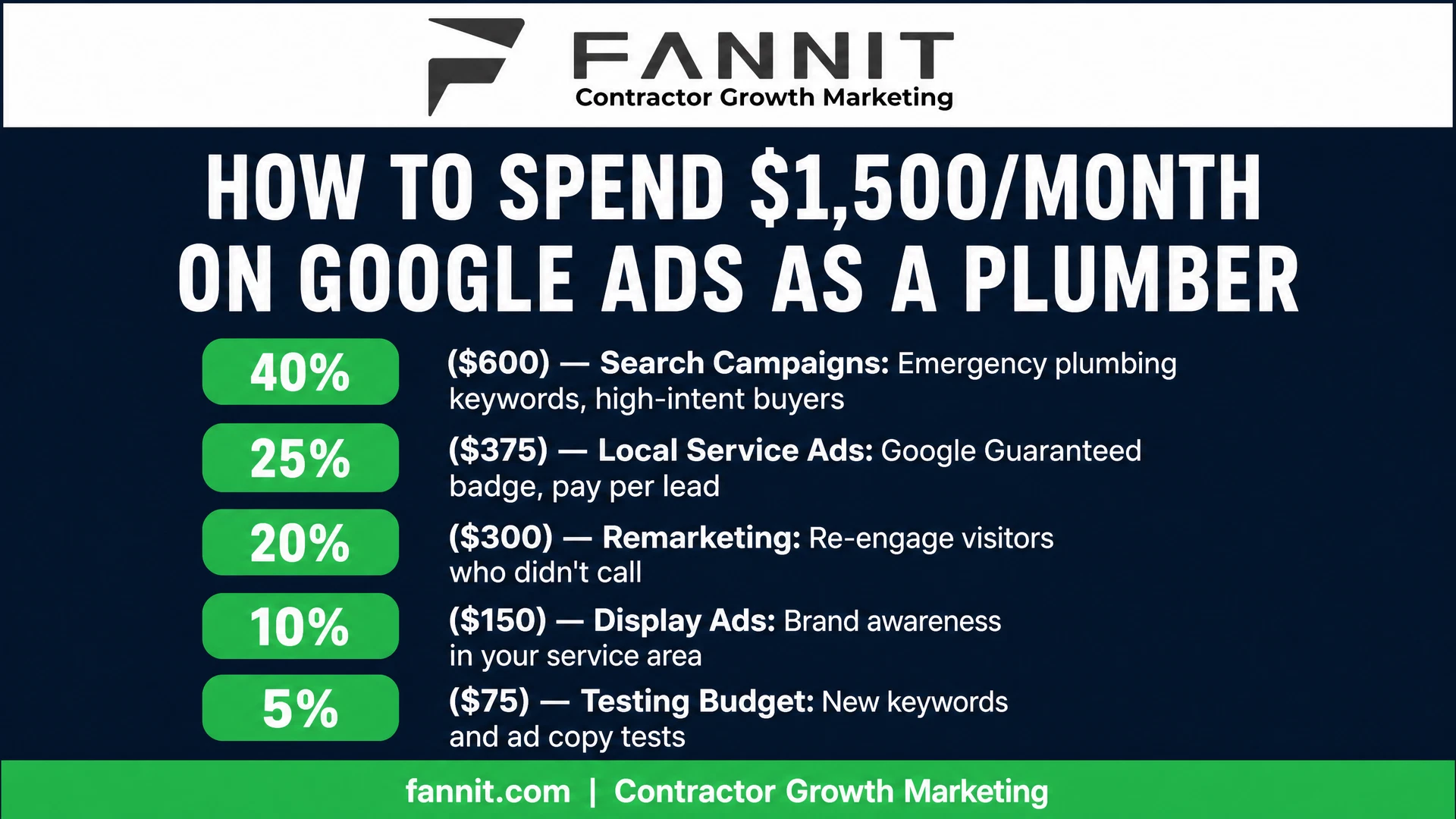
<a href="https://www.fannit.com/blog/google-ads-for-contractors-small-plumbing-budget-guide/" title="Google Ads Budget Guide for Plumbers — Plumbing Marketing Agency"><img src="https://www.fannit.com/manus-storage/infographic-plumbing-google-ads-budget_1a6cde57.png" alt="Google Ads Budget Guide for Plumbers — Plumbing Marketing Agency [Infographic]" width="800" /></a><br /><small><a href="https://www.fannit.com/blog/google-ads-for-contractors-small-plumbing-budget-guide/">Google Ads Budget Guide for Plumbers — Plumbing Marketing Agency</a> via <a href="https://www.fannit.com">Fannit | Contractor Growth Marketing</a></small>

Keith Eneix is the Co-Founder and President of Fannit, a digital marketing agency built exclusively for home service contractors. He still owns and operates a multi-seven-figure contracting business in the Pacific Northwest. Since 2010, Fannit has helped 200+ contractors generate $100M+ in documented revenue.
Full Bio

